Overview
What is EXIF Watcher?
EXIF Watcher reads the camera metadata from every image in an archive and turns it into a branded, multi-sheet Excel report: how many frames each photographer shot, the bodies and lenses they used, their average ISO / aperture / focal length, and a per-date breakdown — across a whole season or a single event.
It answers “who shot what, with what, and how” without opening a single folder by hand. Metadata is read natively on your Mac — no extra tools or external software required.
Audience
Who is it for?
Photo editors, photo chiefs, and team/league staff who manage a roster of shooters and want hard numbers — staffing and coverage, gear usage, and shooting patterns — from the archive they already have.
Requirements
What do I need?
- macOS 13 (Ventura) or later, Apple Silicon or Intel.
- An archive folder of images. Nothing else to install — metadata is read natively on your Mac, and the Excel writer is built in.
Installation
How do I install it?
Open the .dmg and drag EXIF Watcher into Applications. It ships signed with a Developer ID and notarized by Apple, so it opens cleanly. On an older macOS, right-click → Open → Open once.
Licensing
How does activation work?
Unlock with a 25-character key, validated online once against the license server, then verified offline at every launch after that.
Running a report
How do I use it?
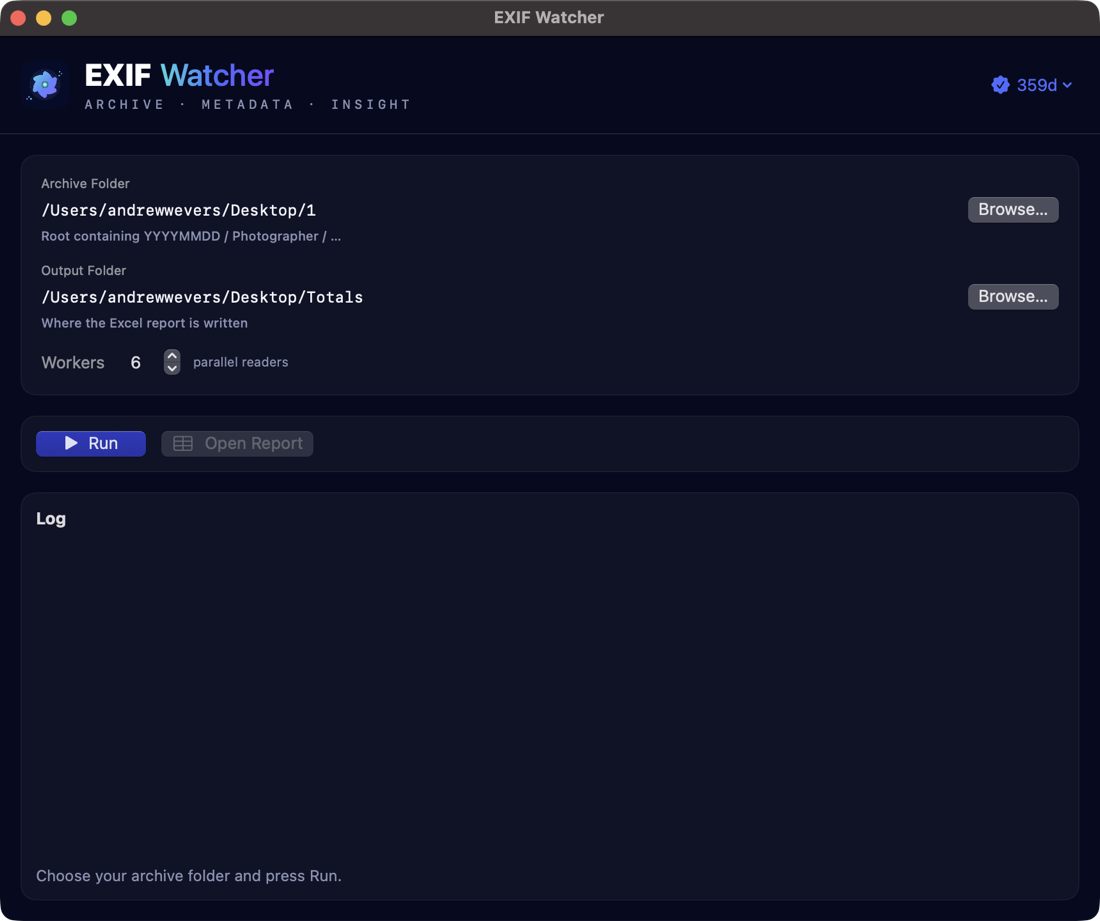
- Archive Folder — the root of your event or season archive.
- Output Folder — where the
.xlsxreport is written. - Workers — how many images to read in parallel (default 6).
- Run — a live log streams progress; Open Report opens the finished workbook.
The report is timestamped (exif_watcher_<timestamp>.xlsx), so each run is its own file.
Archive layout
How should my archive be organized?
EXIF Watcher reads the date and photographer from the folder path. Lay the archive out as date → photographer:
ARCHIVE_ROOT/
  YYYYMMDD/
    Photographer Name/
      any/subfolders/
        AW1_0280.jpg   AW2_8156.CR3   …
Anything in subfolders below a photographer is flattened — it all counts toward that photographer for that date.
The report
What’s in the workbook?
| Sheet | Contents |
|---|---|
| Summary | Title header with N frames · M photographers · D days, the archive path, RAW / all-files / metadata counts, and total data size. |
| All_Photographers | Per photographer: frames, top body, top lens, average ISO, average f-stop, average focal length, and days shot. |
| Overall_Camera_Totals | Every camera body, ranked by frame count. |
| Overall_Lens_Totals | Every lens, ranked by frame count. |
| One per photographer | A dedicated sheet each: header stats plus camera, lens and per-date frame breakdowns. |
Supported formats
Which files does it read?
JPEG, TIFF, HEIC, and RAW — CR2, CR3, NEF, ARW, DNG, RAF, ORF, RW2, PEF, SRW — subject to the RAW codec installed in your copy of macOS. Files without readable camera metadata are counted but simply contribute no camera details.
Your files & privacy
Does anything leave my Mac?
No. EXIF Watcher reads your archive locally and writes the report to the folder you choose. Nothing about your images is uploaded; there’s no telemetry. (The only network use is the one-time license activation.)
Troubleshooting
A photographer’s frames are split or mislabeled.
EXIF Watcher reads the photographer name from the folder path, so a name spelled two ways (or an extra folder level) reads as two photographers. Keep one consistent YYYYMMDD/Photographer Name/ layout.
RAW frames show no camera details.
That format’s RAW codec may not be installed in your macOS. Camera bodies and lenses are read where the codec supports them; the frame still counts toward totals.
Support
How do I get help?
Email andrew.wevers@gmail.com — include your macOS version and a note on how your archive is laid out.